Prime Cost Demystified: The One Number That Predicts Restaurant Profitability
Prime cost is the restaurant industry's most important single metric — the combined weight of food cost and labor against your total revenue. Operators who track it weekly make better decisions than those who wait for month-end P&Ls to tell them something went wrong.
13 min readWritten by: RCS Product Team
What You Will Learn
From Prime Cost Formula to Weekly Control
This guide explains what prime cost is, why it matters more than any other single restaurant metric, how to calculate it accurately, and how to use RCS to track it in real time — before margin slips past the point of easy correction.
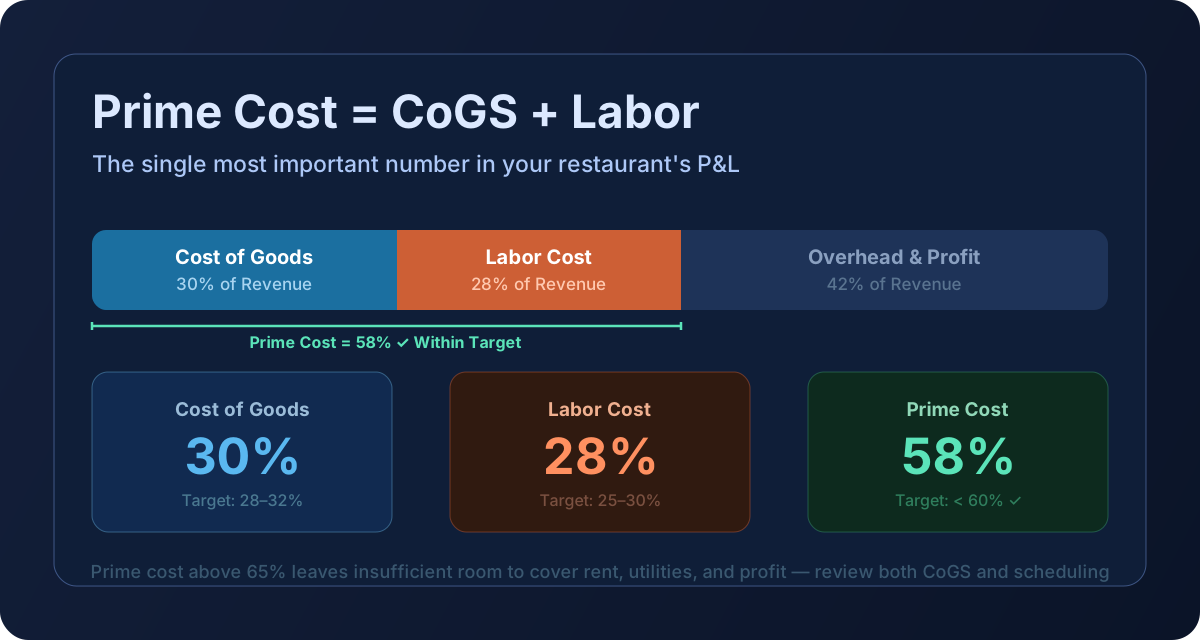
Prime cost is the sum of your two largest and most controllable expenses: Cost of Goods Sold (COGS) and total labor cost. It represents everything you spend to produce and deliver your food and beverage products, including the people who make them.
COGS captures ingredient purchases — everything that goes into the plate: food, beverages, paper goods, and packaging for carry-out. Total labor cost includes gross wages, employer payroll taxes, employee benefits, and workers' compensation insurance. Notice what it does not include: rent, utilities, or other fixed overhead. Prime cost is purely the variable and semi-variable cost layer — the part you can actively manage shift by shift.
That controllability is why operators, consultants, and investors treat prime cost as the restaurant industry's report card. A restaurant running prime cost at 58% of sales has roughly 42 cents of every sales dollar remaining to cover rent, utilities, repairs, debt service, marketing, and net profit. A restaurant running prime cost at 72% has 28 cents. The difference is not academic — it often separates profitable operations from operators who are working hard to lose money slowly.
Industry data from the National Restaurant Association puts the picture in sharp relief: 42% of restaurant operators reported not being profitable in 2025, even as the industry projected $1.55 trillion in total sales for 2026. Scale does not automatically create margin. Control does.
What Prime Cost Is Used for in Restaurants
Prime cost is more than a reporting number — it is an active operating tool. Here is how well-run operations use it:
Weekly profitability checkpoint. Monthly P&Ls tell you what happened. Weekly prime cost tells you what is happening. A 3-point drift caught in week two is an adjustment; the same drift discovered at month-end is a loss that already occurred.
Budget target alignment. Owners and operators set prime cost targets at the beginning of each period. The weekly number becomes the accountability metric — for the kitchen, for the floor, and for management.
Identifying where the problem lives. Because prime cost is two variables — COGS and labor — an elevated number points you toward the right investigation. If food cost is on target but labor is spiking, the problem is in scheduling, overtime, or staffing model, not in the kitchen. That directional clarity saves hours of diagnosis.
Pricing and menu engineering input. When prime cost runs high, operators face a binary choice: reduce cost or increase revenue. Prime cost data quantifies how much menu price adjustment is needed to restore margin without changing operations.
Investor and lender communication. Sophisticated lenders and investors evaluate restaurants partly on prime cost history. A consistent, well-managed prime cost signals operational discipline. Erratic numbers signal fragility.
Concept benchmarking. Prime cost varies by concept type. A QSR running at 57% is performing well. A full-service white-tablecloth concept at 57% is exceptional. Knowing your category benchmark is the prerequisite to knowing whether your number is a win or a warning.
Pre-sale due diligence. When operators consider selling their restaurant, buyers calculate normalized prime cost over 24–36 months to assess true earning power. Clean, consistent data commands premium valuations.
How to Calculate Prime Cost
The calculation is straightforward. The discipline to run it correctly and consistently is what separates operators who benefit from it versus those who calculate it wrong and act on bad data.
1
Prime Cost
COGS + Total Labor Cost
Every dollar you spend to produce food and staff your restaurant. COGS = Beginning Inventory + Purchases − Ending Inventory; Total Labor = Gross Wages + Payroll Taxes + Benefits + Workers' Comp.
Using net wages instead of total labor. If you exclude payroll taxes (typically 7–8% of gross wages) and benefits, you understate labor cost by 10–20% and produce a falsely optimistic prime cost number. Include every cost of employment, not just the check that clears the bank.
Using purchases instead of COGS. Purchases in a period are not the same as what you consumed. A week with a large produce order overstates COGS; a week with minimal deliveries understates it. The COGS formula — beginning inventory plus purchases minus ending inventory — captures actual consumption. This is why weekly inventory counts matter even when they feel like an operational burden.
A practical example: a casual dining restaurant does $42,000 in food and beverage sales in a given week. COGS (using accurate inventory counts) is $13,440. Total labor — gross wages, taxes, and benefits — is $11,760. Prime cost is $25,200. Prime cost percentage: $25,200 ÷ $42,000 = 60.0%. That is within target range for a casual dining operation. Now consider the same restaurant with $14,700 in COGS (a modest food cost increase from a vendor price change that was not caught) and the same labor: prime cost percentage jumps to 62.9% — still in range but trending toward the boundary. Another two points of drift and the operator is in action-required territory. Catching that vendor price change via weekly tracking rather than monthly reporting saves real dollars.
Tutorial: How to Use Prime Cost Tracking in Restaurant Core Systems
RCS provides weekly prime cost visibility by connecting invoice ingestion, inventory, and labor data in a single operating layer. Here is how to run the workflow:
Complete your weekly inventory close in Operations → Inventory. The ending inventory value becomes the COGS denominator anchor. RCS calculates COGS automatically using the beginning inventory from the prior period close, purchases ingested via invoice upload, and the new ending count.
Confirm that all vendor invoices for the week have been ingested, reviewed, and applied in Operations → Invoice Upload. Unposted invoices understate COGS and produce an optimistic but wrong prime cost number.
Enter or confirm total labor cost for the period in the labor input panel. RCS supports direct entry of gross wages plus an employer cost percentage (taxes + benefits) so the full employment cost — not just payroll checks — is captured.
Open the Prime Cost dashboard card. RCS calculates prime cost percentage automatically from the COGS and labor figures against POS-sourced sales for the same period window.
Compare the calculated percentage against your configured target range. RCS flags results outside the target with color-coded indicators so the status is visible at a glance without manual comparison.
Drill into the COGS or labor component to identify where the variance originated. If food cost is elevated, check the Invoice List for price changes in high-spend categories. If labor is elevated, review scheduled hours against actual sales for that period.
Document the identified root cause and the corrective action in your weekly manager notes. Over time, this builds an operational record that supports pattern identification and performance reviews.
Recommended cadence: run prime cost every week without exception. For high-volume operations or concepts under financial pressure, run a mid-week labor check against sales-to-date to detect scheduling issues before the week closes. The cost of the extra 20 minutes is trivial against the cost of discovering a problem after it has already run for seven days.
If you are new to RCS or building prime cost tracking for the first time, the RCS consulting team can help you configure your target thresholds by concept type, set up labor cost capture to include all employer costs, and establish the weekly inventory cadence that makes COGS accurate. Contact info@restaurantcoresys.com to schedule a setup session.