Restaurant Labor Cost: How to Stay Under 30% Without Burning Out Your Team
Labor cost percentage is the most persistent pressure point in restaurant operations today. With 19 states raising minimum wages in 2026 and full-service medians already above 36%, the operators who are winning are not cutting staff — they are scheduling smarter, cross-training deeper, and measuring in real time instead of after payroll runs.
13 min readWritten by: RCS Product Team
What You Will Learn
From Labor Cost Formula to Real-Time Payroll Control
This guide explains what labor cost percentage is, what it actually includes, how to calculate it correctly, 2026 benchmarks by concept type, and how to use RCS labor tools to track and manage it before payroll closes — not after.
Restaurant labor cost is the total expense of employing every person on your payroll — not just the wages on their paychecks. A complete and accurate labor cost figure includes gross wages, employer-side payroll taxes (FICA, FUTA, SUTA), employee benefits such as health insurance and paid time off, and workers' compensation insurance premiums. Omitting any of these understates your true labor cost and produces an optimistic but misleading percentage.
In practice, employer payroll taxes add 7–10% on top of gross wages, and benefits can add another 5–15% depending on the program. A cook earning $18/hour has a total employment cost closer to $20–$22/hour when these additional costs are included. Schedules built around hourly wage rates — rather than total employment cost — routinely underestimate labor cost by 15–25% before a shift even starts.
Labor cost is also different from labor hours. Two restaurants with identical headcount can have vastly different labor cost percentages depending on their wage rates, benefit structures, overtime patterns, and most importantly, their sales volume. A restaurant doing $60,000/week in revenue can sustain a higher absolute dollar labor spend at the same percentage as one doing $30,000/week. This is why the percentage — not the dollar amount — is the meaningful management metric.
The labor cost context in 2026 is challenging. 98% of operators cite labor as a top concern according to NRA data. Full-service operations ran a median labor cost of 36.5% in 2024 — above the historical ~33% benchmark — and limited-service ran 31.7% against a historical ~28%. California's fast-food wage increases raised operating costs by approximately 9% overall. Hawaii's minimum wage moved from $14 to $16/hour in 2026, heading to $18 by 2028. The operators achieving sub-30% labor cost in this environment are doing it through demand-based scheduling, cross-training discipline, and real-time visibility — not by paying people less.
What Labor Cost Percentage Is Used for in Restaurants
Labor cost percentage is both a performance metric and a scheduling constraint. Operators use it for:
Scheduling budget discipline. When you know your labor cost target percentage and your projected sales for a given week, you can calculate the maximum dollar labor budget before building the schedule — not after running payroll. This turns scheduling from an art into a constrained optimization problem with a clear answer.
Prime cost component tracking. Labor is one of the two variables in prime cost. When prime cost runs above target, separating the food cost and labor components tells you where to direct the corrective effort. An elevated prime cost caused by labor requires a scheduling or staffing solution; one caused by COGS requires a purchasing or recipe solution. Conflating the two leads to the wrong fix.
Overtime identification. A single full-time employee working 5 hours of overtime per week at $15/hour costs an additional $1,950/year at 1.5x pay. Across a team of 20 staff with average overtime, unplanned overtime can add $30,000–$50,000 annually to labor cost — a figure that rarely appears as a line item but always appears in the labor percentage.
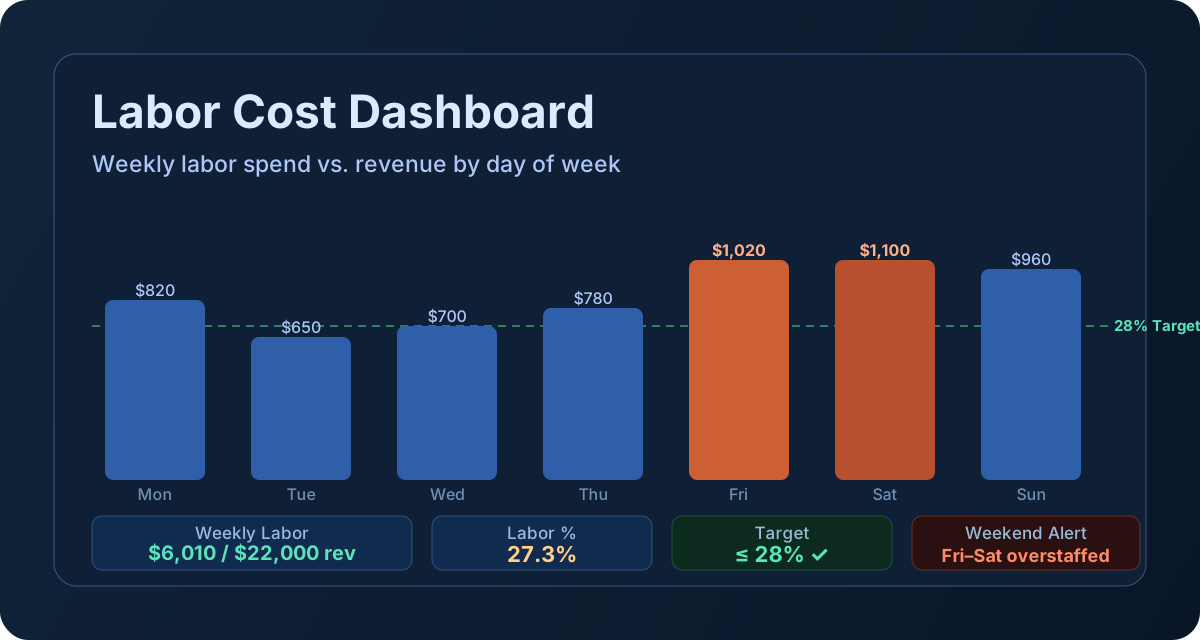
Daypart and shift profitability. Breaking labor cost down by shift or daypart reveals whether your Tuesday lunch crew is appropriately sized for Tuesday lunch sales, or whether you are staffing to Friday levels on a Tuesday. Daypart-level analysis requires matching labor hours to sales for the same window — something that is impossible without data, and obvious once you have it.
Cross-training ROI measurement. Cross-trained employees reduce overtime exposure by creating scheduling flexibility — a trained cook who can also work prep or a server who can handle takeout expands your coverage options without adding headcount. Tracking labor cost percentage before and after cross-training programs provides a measurable ROI on the training investment.
Wage increase scenario modeling. When minimum wages change, labor cost percentage provides the bridge between the new hourly rate and its P&L impact. A $1/hour wage increase for 15 employees working 30 hours/week adds $23,400/year in labor cost — knowing the current sales volume instantly tells you how many basis points that adds to your labor percentage and what the required offset is.
How to Calculate Labor Cost Percentage
The formula is simple. Getting the inputs right — especially on the labor side — is where most operators introduce error.
1
Labor Cost %
(Total Labor Cost ÷ Total Revenue) × 100
Every dollar spent on wages, taxes, and benefits as a share of revenue. Target: 24–35% by concept — but 2026 medians run 3–6 points higher than targets for most concepts.
Don't track gross wages alone — FICA (~7.65%), health insurance, PTO, and workers' comp add 15–20% on top of what shows on the schedule.
3
Weekly Labor Budget
Projected Revenue × Target Labor Cost %
Set your ceiling before building the schedule, not after. At $42,000 projected sales and 30% target: $12,600 maximum — schedule to the budget, not to habit.
The scheduling-before-payroll method: the most powerful application of the labor cost formula is to use it prospectively rather than retrospectively. Before building the weekly schedule, calculate your labor budget from projected sales. Then build the schedule to fit within that budget — scheduling to sales rather than scheduling to coverage habit. This requires a reliable sales forecast (your POS history for the same day and week type in prior periods is the starting point) and the discipline to build the schedule to the budget rather than the instinct.
The demand-based scheduling model: matching staffing levels to actual sales patterns is the single most effective labor cost control tool available to operators who are not yet using it. A restaurant that overstaffs Tuesday by two servers and understaffs Friday by one is not just paying more on Tuesday — it is also delivering worse service on Friday, which costs revenue. The data to build demand-based schedules already exists in every POS system. The question is whether operators are using it.
Tutorial: How to Use Labor Cost Tools in Restaurant Core Systems
Dashboard → Prime Cost → Labor Input → Weekly Labor % → Schedule vs. Sales Review
RCS connects labor cost inputs to the prime cost dashboard so operators see labor percentage as part of a complete weekly performance picture. Here is how to run the workflow:
At the start of each week, pull your projected sales figure from POS history for the same day/week type in the prior three to four weeks. Apply any known adjustments (holidays, events, weather patterns). This becomes your labor budget anchor.
Calculate your maximum labor dollar budget: Projected Sales × Target Labor Cost %. For a $42,000 week at a 30% target, the budget is $12,600. Build your schedule to fit within this figure before finalizing it — not after running payroll.
At the end of each pay period, enter or confirm total labor cost in the RCS labor input panel. Include gross wages, employer taxes, and benefits. If you use a payroll service that reports total employer cost (including taxes and benefits), use that figure directly. If not, apply your configured employer cost multiplier (typically 1.10–1.20× gross wages) to capture the full employment cost.
Open the Prime Cost dashboard. RCS displays labor cost percentage alongside COGS and calculates total prime cost for the period. If labor percentage is above target, the dashboard flags it immediately.
If labor is elevated, break the analysis down by shift type or daypart. Look for patterns: is overtime concentrated in a specific day of the week? Is a particular shift consistently running above budget relative to sales? The pattern usually reveals whether the root cause is scheduling, call-out coverage, overtime accumulation, or a mismatch between the staffing model and actual sales volume.
Use the corrective action to adjust the following week's schedule before the problem recurs. RCS consulting engagements include building cross-training matrices and scheduling templates calibrated to your specific sales patterns — reducing overtime exposure while maintaining service quality.
Review labor cost percentage trend over rolling 4–8 weeks, not just the most recent period. Single-week spikes from holidays or special events are normal. A steady upward trend is a structural problem that requires a scheduling or staffing model change, not a one-week fix.
Recommended cadence: check labor against projected sales at mid-week — not just at period close. A mid-week check gives you the ability to adjust: send staff home early on a slow night, add a shift on a busier-than-expected weekend, or prevent an employee from hitting 40 hours before the week closes. These small interventions compound into significant annual labor cost savings over time.